
Dayan AI — the AI assistant for university stakeholders
Dayan AI is an intelligent assistant developed by Eques AI for the university community as a whole: its students, faculty members, administrative staff and academic leadership. It is deployed per institution and works over that institution’s own academic data — courses, curricula, students, instructors and rooms — so every answer, schedule and report reflects the university as it actually is, never generic information.
Through a single conversational interface, in English or Arabic, students consult their courses, prerequisites, credit hours and timetables; departments and faculties prepare, validate and approve their academic schedules phase by phase, each workbook checked against the institution’s rules before the next phase begins; and staff obtain the corresponding schedule records and reports as documents ready to review and share. Access is through the university’s own Google sign-in, with role-based permissions defining what each member can see and do. Dayan AI is in service at Heliopolis University, where members sign in with their institutional @hu.edu.eg Google account.
ديان مساعد ذكي طوّرته شركة Eques AI لخدمة المجتمع الجامعي بكل فئاته: الطلاب وأعضاء هيئة التدريس والجهاز الإداري والقيادات الأكاديمية. يُنشر ديان لكل مؤسسة على حدة، ويعمل على بياناتها الأكاديمية الخاصة — المقررات والمناهج والطلاب وأعضاء هيئة التدريس والقاعات — فتأتي كل إجابة وكل جدول وكل تقرير معبّرة عن واقع الجامعة الفعلي لا عن معلومات عامة.
وعبر واجهة محادثة واحدة، بالعربية أو الإنجليزية، يستعرض الطلاب مقرراتهم ومتطلباتها السابقة وساعاتها المعتمدة وجداولهم الدراسية؛ وتُعدّ الأقسام والكليات جداولها الأكاديمية وتراجعها وتعتمدها مرحلةً بعد مرحلة، مع التحقق من كل ملف وفق قواعد المؤسسة قبل بدء المرحلة التالية؛ ويحصل الموظفون على سجلات الجداول وتقاريرها في صورة مستندات جاهزة للمراجعة والمشاركة. ويتم الدخول بحساب Google الجامعي، فيما تحدد الصلاحيات المرتبطة بدور كل عضو ما يمكنه الاطلاع عليه وإنجازه. يعمل ديان حاليًا في جامعة هليوبوليس، حيث يسجّل أعضاؤها الدخول بحساب الجامعة على Google (@hu.edu.eg).
Access is reserved for the universities at which Dayan AI is deployed — at present Heliopolis University, whose members use it free of charge during the pilot phase.

One assistant for everyone in the university
Every member signs in with the university's Google account. Their role decides what they see, and what Dayan can do for them.
Students
- Ask about courses, prerequisites and credit hours
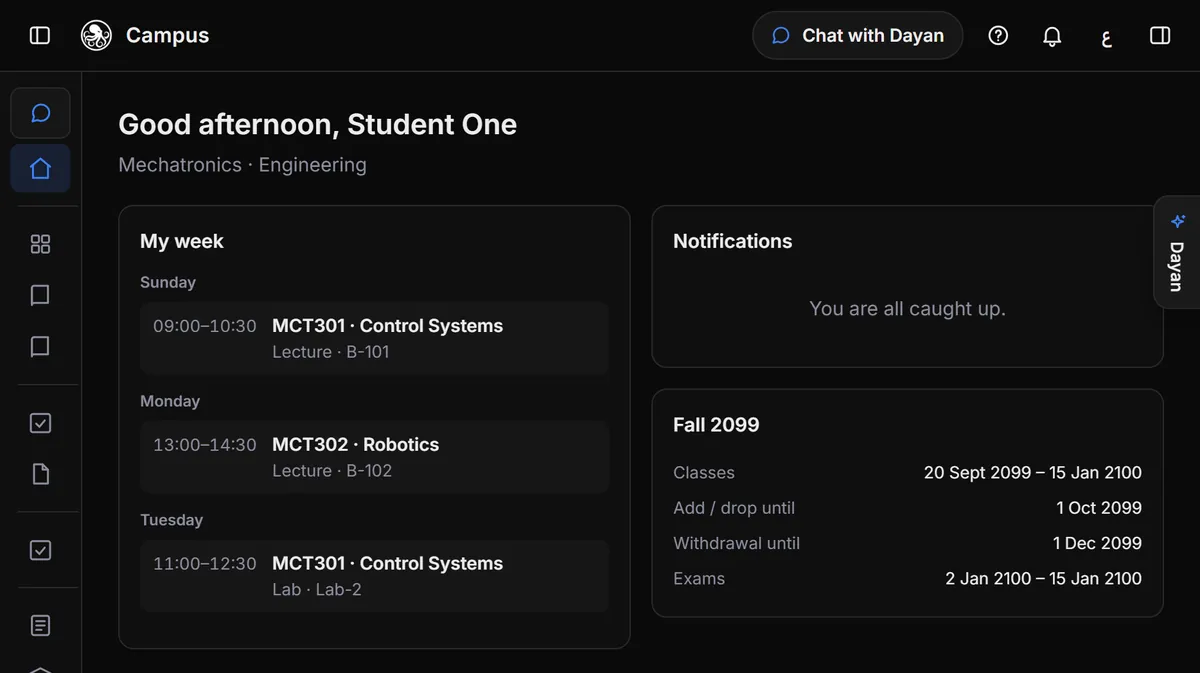
- See the week's classes and the term's dates on Campus
- Take quizzes and hand in assignments online
- Check in to class by scanning a QR code
Instructors
- Prepare slides, quizzes, assignments, sheets and exams with Dayan
- Take attendance with a code that changes every 20 seconds
- Mark work, publish grades and post course announcements
Department and faculty staff
- Prepare and validate the department's schedule, phase by phase
- Download schedule records and reports in English or Arabic
- Approve members' links to their timetable names, follow teaching load and book rooms
Administrators
- Analytics and early warning across the university
- Admissions, finance, HR, facilities and the exam timetable
- Set scheduling rules and locks from the chat
Everything starts with a conversation
Ask in your own words, in English or Egyptian Arabic, attach a file, or pick a task from the Quick menu.
Department scheduling, phase by phase
Dayan walks a department through the eight scheduling phases, from the curriculum to the preferred times. Every workbook comes prefilled with the data on file, is checked against the university's rules, and comes back with the reason for each correction. A department that stops picks up where it left off.
How university scheduling works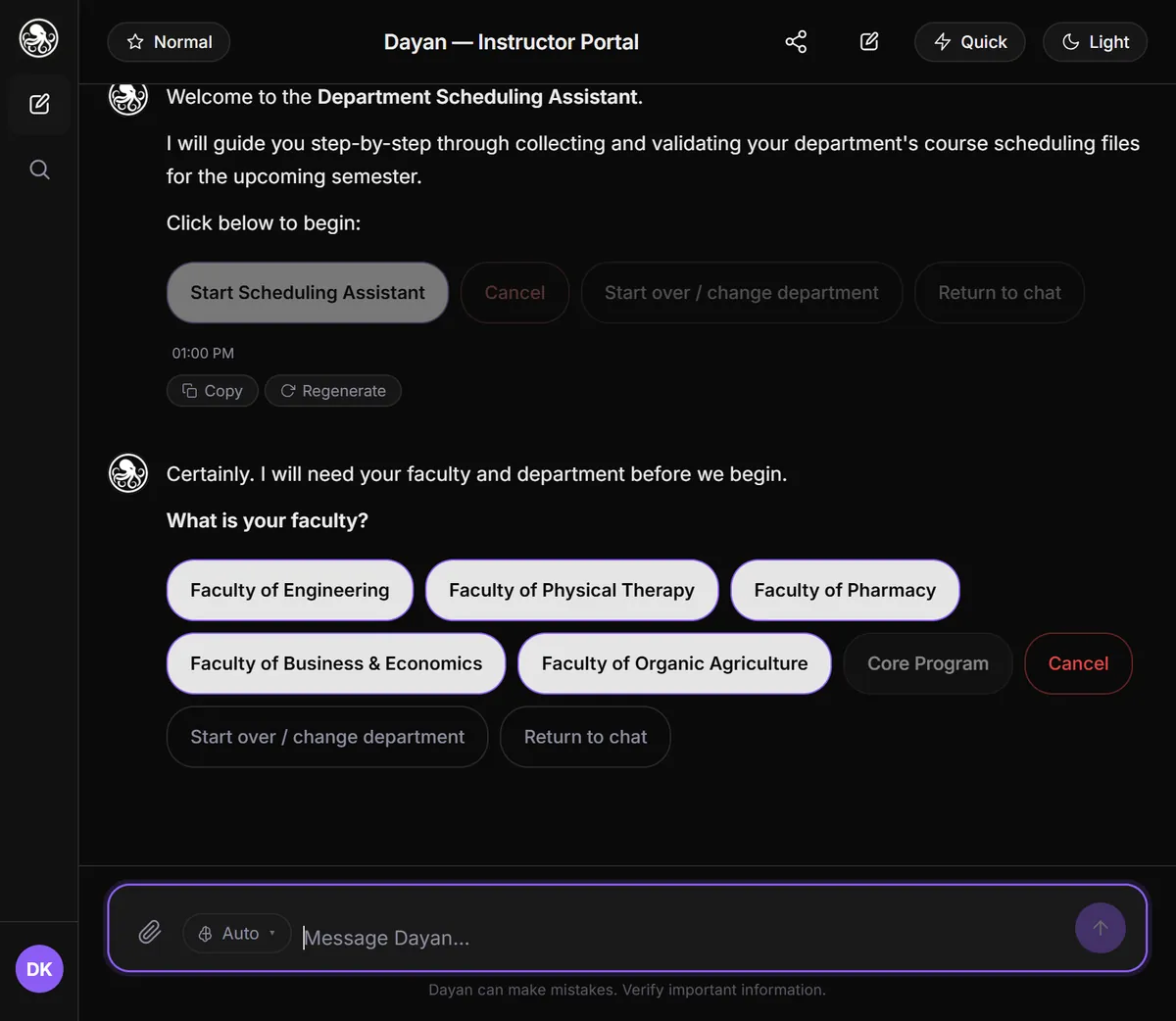
Course advising
Which courses can I take next term? What does this one require? How many credit hours is it? Dayan answers from the course guide and the data on file.
Records and reports
Schedule records, faculty timetables and printable schedules, as Excel, PDF, Word or PowerPoint, in English or Arabic.
Research help
From a short brief to a research paper or a literature review with its references, delivered as a PDF.
The NEWS board
Spread the NEWS to the whole university, a faculty or a department, for students, instructors or both. "What's going on?" shows what was shared with you.
Your files and pictures
Attach a Word, Excel or PowerPoint file and ask for changes: Dayan edits it in place. A new deck, document, workbook or PDF starts with a few quick questions about its look and content. Pictures are made, or enhanced, right in the chat.
Dayan Agent on your computer
A guided setup for Windows, Mac (macOS) or Linux connects an AI agent on your own computer to Dayan, with your personal key.
Get the Dayan IDE installerPremium
For the biggest pieces of work: a few questions, your approval, then a carefully prepared result. Every member can try it with two free requests.
Dayan Campus: the university's platform, with Dayan on every page
Courses, attendance, assessment, services and the offices' work in one place. Ask Dayan about any page from its side panel, without leaving it.
- Built on the approved timetable. Courses, sections and rooms come from the schedule the departments confirmed.
- Approved before it is shared. Nothing reaches a student until the lecturer approves it.
- Notices that find you. In English and Arabic, on the phone or the computer, with Web Push alerts.
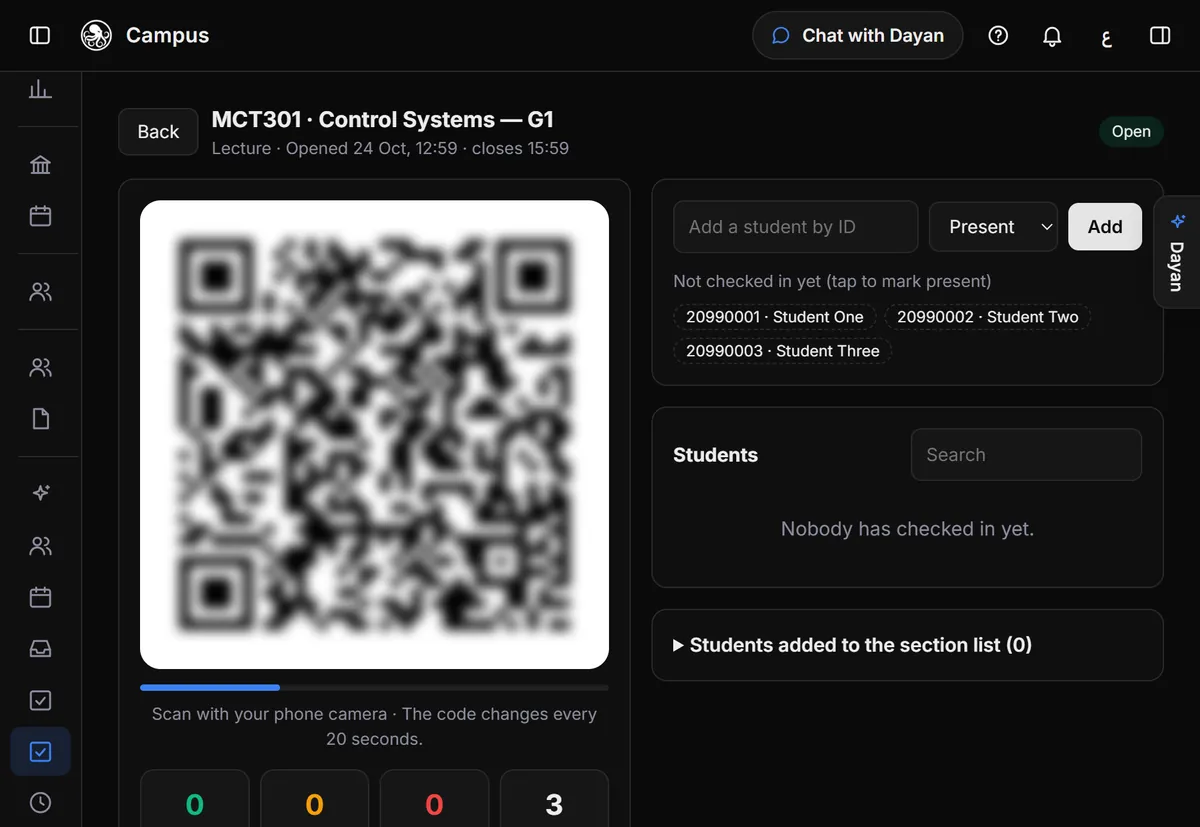
Attendance in the time it takes to scan a code
The lecturer opens a session for the class on the timetable and shows its QR code. Students scan it with their phones. The code changes every 20 seconds, latecomers are marked late, and anyone expected who does not check in is recorded absent when the session closes.
Teaching and learning
- My coursesThe courses you teach or take, from the approved timetable.
- Course pageEverything approved for a course, week by week.
- Prepare with DayanSlides, sheets, quizzes, assignments, summaries, exams and specs, drafted after a few short questions.
- Lecture studioOne lecture PDF a week, prepared step by step.
- QuizzesDrafted from the lecture slides, approved by the lecturer, taken online.
- AssignmentsSet, handed in and marked in one place.
- Section and lab sheetsFor each group's sections and labs.
- Summaries and revisionWeekly summaries, revision packs and a key-terms glossary in English and Arabic.
- Course tutorA course chat, switched on by its lecturer, that answers only from the approved slides and says where.
- ExamsExam papers with their model answers and marking.
- Course specsSpecifications, syllabi and end-of-term course reports.
- GradebookMarks entered, published and read.
- ForumCourse announcements, discussions and a weekly digest.
- LibraryEach course's reading list.
Attendance and the term
- Attendance by QR codeA code that changes every 20 seconds; late and absent recorded.
- CalendarThe term's weeks, dates and deadlines.
- RegistrationPlan the term's courses; the requests go to the registrar.
- Exam timetableSittings, rooms, invigilation and seating.
- NoticesEvery Campus notice in one list, with Web Push alerts.
Student services
- ServicesLetters, certificates and other requests, routed to the right office.
- Verify a documentCheck that a Campus document is genuine.
- My feesFees and payments, as the finance office records them.
- GuardiansA guardian follows a student's progress only with the student's consent.
- My privacyWhat Campus keeps about you, and your requests.
- Report a problemA broken projector, light or seat.
Departments and the university
- ApprovalsLink members to their names on the timetable, and assign a substitute.
- Analytics and early warningProgress, attendance, room use and the students who may need help. Ask in plain words.
- Workload and leaveTeaching load against the policy, and leave requests.
- RoomsFind a free room from the timetable and book it.
- AdmissionsApplications from new students, from the apply page to onboarding.
- ConductCases and their decisions, with due process.
- AlumniThe graduates' directory.
- Finance officeThe fees of the students in your scope.
How it works
-
Sign in
Use your university Google account. There is no separate password.
-
Ask or choose
Write in English or Arabic, attach a file, or pick a task from the Quick menu.
-
Get it done
Dayan answers, prepares the file or opens the next step. Your role decides what you can see and approve.
Your university's data, rules and roles
Dayan is deployed for one institution at a time and works over that institution's own data.
- Deployed per university, configured for its curriculum, rules and roles.
- Answers, schedules and reports come from the university's own data, never generic information.
- Sign-in is the university's Google account, and each member's role decides what they can open.
- A student sees only their own records.
- Messages are processed by outside AI providers only to write the reply, and your data is never sold. See the Privacy Policy.
- Optional: connect your own Google account in Settings → Connected accounts, one feature at a time, to ask Dayan about your calendar, add events, send a mail you approved from your Gmail, or save Dayan's files to your Drive. Nothing is sent or changed without your confirm, and Google data is never used to train AI models. See Google user data in the Privacy Policy.
- Every file in English or Arabic, with Arabic laid out right to left.
Frequently asked questions
What is Dayan AI?
The AI assistant for university stakeholders, by Eques AI: a chat that answers questions about courses, prerequisites and credit hours, walks departments through the scheduling phases over the data on file, and produces schedule reports — in English or Egyptian Arabic. Its first deployment is Heliopolis University.
What is Dayan Campus?
The university platform inside Dayan: courses, materials, quizzes, assignments, attendance by QR code, grades, the term calendar, registration, services and the offices' tools, built on the approved timetable. It is in its pilot at Heliopolis University.
Is Dayan AI a university scheduling tool?
Yes — an AI assistant for university course scheduling, timetables and academic advising, used through chat. It works over the university's own scheduling pipeline and data; it does not replace them. How it works, phase by phase: university scheduling with Dayan AI.
Who counts as a stakeholder?
Everyone in the university — students, instructors, department and faculty staff, and administrators. Each signs in with the university account and sees what their role allows.
Who can use it?
Every stakeholder of a university where Dayan AI is deployed. Today that is Heliopolis University: sign in with your university Google account (an @hu.edu.eg address); other accounts are not admitted.
How do I sign in?
Open dayan.equesai.tech/login, choose Sign in with Google and pick your @hu.edu.eg account. You land in the chat right away.
Which languages does Dayan speak?
English and Arabic — it replies in Egyptian Arabic when you write in Arabic.
Is Dayan AI free?
It is currently free for Heliopolis University members while the assistant is in its pilot phase; this may change as the service develops. Premium, for the biggest pieces of work, is an optional subscription that every member can try with two free requests.
Who makes Dayan AI?
Eques AI builds and operates Dayan AI; Heliopolis University is its first deployment. Contact — including universities interested in Dayan AI: support@equesai.tech.
Where can I read more?
Everything Dayan AI does is on the features page, the scheduling phases on university scheduling, and what AI does across a university on AI in education.
Bring Dayan AI to your university
Dayan AI is deployed for each university on its own curriculum, rules and data. Write to Eques AI to talk about a deployment.